A laptop keyboard is the built-in set of keys used to type on a laptop, and it can be a membrane, scissor-switch, or backlit unit clipped or soldered to the palmrest. When keys stop responding or letters stick, most laptop keyboards can be replaced without sending the whole machine in for repair.
What a Laptop Keyboard Actually Is
A laptop keyboard sits directly under a thin ribbon cable that plugs into the motherboard. Unlike a desktop keyboard, it’s not a separate accessory. Each key presses down on a rubber dome or a scissor mechanism, which closes a circuit on a membrane sheet underneath. That signal travels through the ribbon cable to the motherboard, which tells the operating system which letter or symbol was pressed.
This design keeps the keyboard thin enough to fit inside a laptop lid, but it also means a small amount of liquid, dust, or a bent ribbon cable can affect several keys at once, not just one.
Common Types of Laptop Keyboards
1. Membrane Keyboards
Membrane keyboards use a soft rubber dome under each key. They’re cheap to produce and common in older or budget laptops. The trade-off is a mushier feel and a shorter lifespan once dust builds up under the keys.
2. Scissor-Switch Keyboards
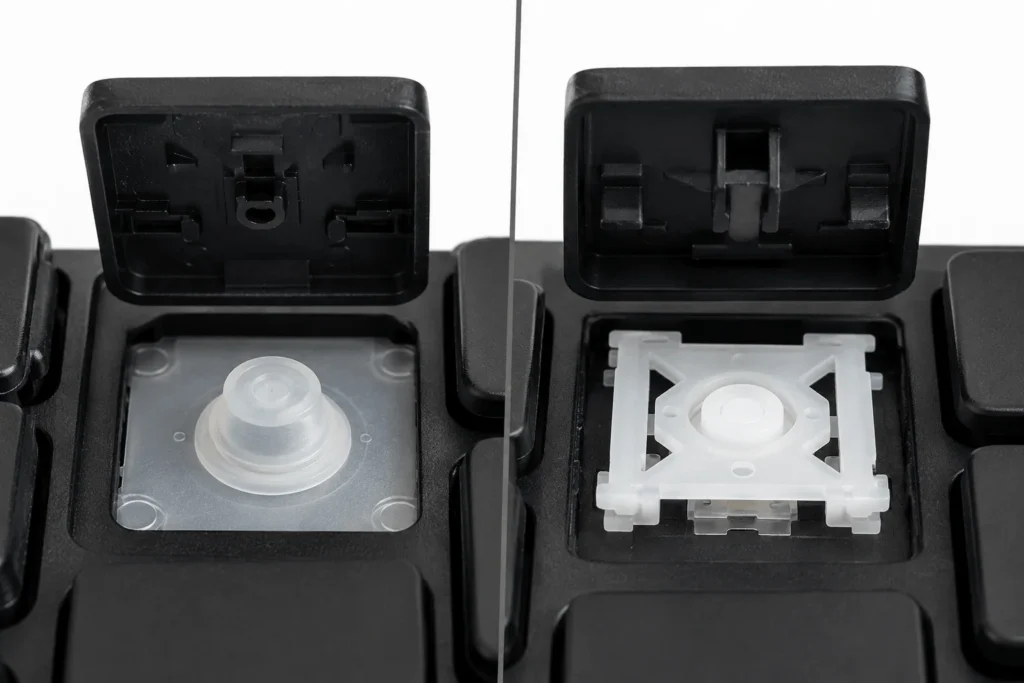
Most modern laptops, including current Dell, HP, and Lenovo models, use scissor-switch keys. A small plastic scissor mechanism keeps each key level and gives a shorter, more precise travel than membrane keys. This is the style most people mean when they picture a slim laptop keyboard today.
3. Backlit Keyboards
A backlit laptop keyboard adds LEDs under the keys so the letters stay visible in low light. It’s a feature, not a separate keyboard type, and it can be layered onto either a membrane or scissor-switch design.

Common Laptop Keyboard Problems
1. Keys Not Typing or Typing the Wrong Character
If several keys stop working or type the wrong letter, the ribbon cable connector is often loose. Reseating it, or having a technician reseat it, fixes this more often than people expect.
2. Sticky or Unresponsive Keys After a Spill
Sugary drinks, tea, and juice leave a residue that keeps a key from springing back even after the laptop has dried out. Water alone sometimes evaporates without lasting damage, but sweet or salty liquids usually mean the affected keys need cleaning or the keyboard needs replacing.
3. Missing or Broken Keycaps
Scissor-switch keycaps clip onto small plastic hinges that snap off over time, especially on frequently used keys like space, enter, and the arrow keys. A snapped hinge means the keycap won’t sit flat even if it’s pushed back on.
Fixing a Laptop Keyboard Before You Replace it
A few keys not responding doesn’t always mean a new keyboard is needed. Shutting the laptop down, turning it upside down, and gently tapping around the affected keys can dislodge crumbs or dust sitting under the keycaps. Compressed air blown at an angle, rather than straight down, clears debris without pushing it further under the keys.
For a spill, disconnect the battery and the keyboard ribbon cable as soon as possible, then let the laptop air-dry for at least 24 hours before testing it. Isopropyl alcohol on a cotton swab can clean sticky residue from under a single keycap, but this only helps with a handful of affected keys, not a keyboard where an entire row has stopped working.
When you Actually Need a Laptop Keyboard Replacement
1. Signs the keyboard, not the software, is the problem
If keys fail consistently across a reboot, in the BIOS screen, and on a different operating system from a USB drive, the fault sits in the hardware. Software issues usually clear up after a driver update or a clean boot; hardware faults don’t.
2. How to Choose the Right Replacement Keyboard
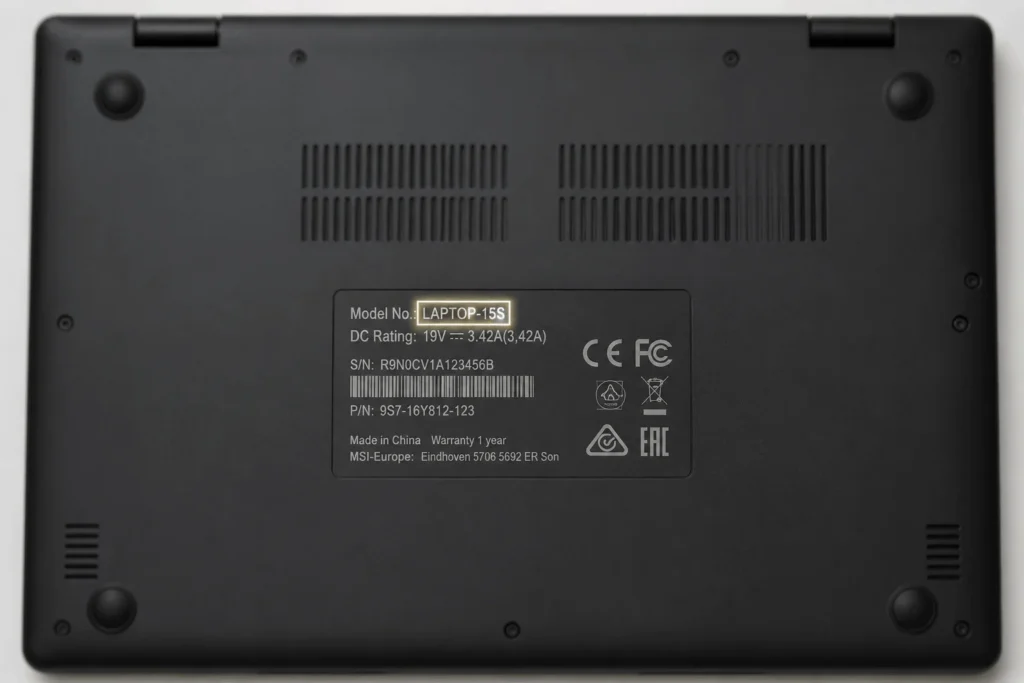
A laptop keyboard is model-specific, not universal, because the ribbon cable connector position and the frame shape differ even between two laptops from the same brand. The safest way to order one is by the exact model number printed on the base of the laptop, for example a specific Dell Inspiron, HP Pavilion, or Lenovo IdeaPad generation, rather than by brand name alone. Buyers also need to check whether their original keyboard was backlit, since backlit and non-backlit versions of the same model usually aren’t interchangeable.
Laptop Keyboard Price and What Affects it
Laptop keyboard prices vary by brand, whether the unit is backlit, and whether it’s an original part or a compatible aftermarket replacement. In Pakistan’s local parts market, Rs 2,000 to Rs 5,000 covers most standard non-backlit keyboards for common Dell, HP, Acer, and Lenovo models, while backlit keyboards and less common brands like Apple, Sony, or Toshiba sit at the higher end of that range or above it.
Installing a Laptop Keyboard: What to Expect
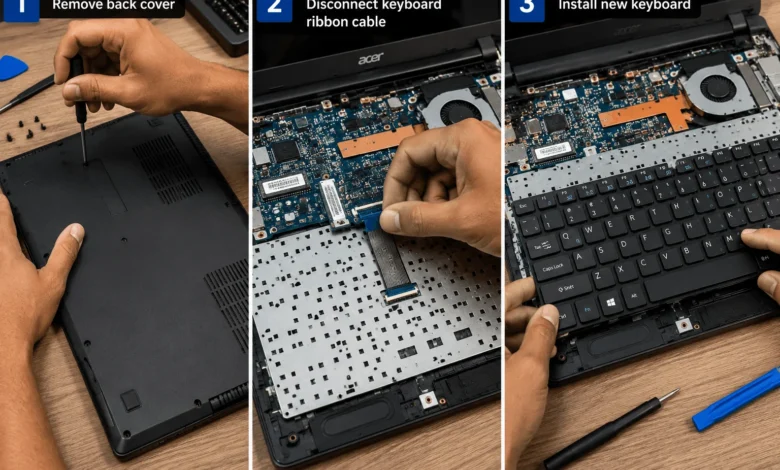
Replacing a laptop keyboard usually means removing the back cover or the top bezel, depending on the model, unclipping the old ribbon cable, and sliding the new keyboard into place. Some laptops need the palmrest lifted off first, which is a more involved job. A technician typically finishes a standard swap within 20 to 30 minutes once the correct part is in hand; doing it without the right tools or a model-specific guide risks cracking the plastic clips around the keyboard frame.
Using an External Keyboard as a Temporary Fix
An external USB or Bluetooth keyboard keeps a laptop usable while a replacement part is on order. It won’t fix the built-in keyboard, but it avoids downtime, especially for anyone who needs the laptop for work in the days between diagnosing the fault and receiving the correct part.
Getting a laptop keyboard working again usually comes down to identifying whether the fault is a few dirty keys or a genuine hardware failure, then ordering the exact model-matched part rather than a generic one.
FAQ’S Laptop Keyboard Questions People Ask
1. Can a laptop keyboard be repaired instead of replaced?
Yes, for issues like dust, crumbs, or a loose ribbon cable. A hardware fault affecting many keys at once, or a keyboard damaged by a sweet or salty spill, usually needs a full replacement rather than a repair.
2. Why do only some keys on my laptop stop working?
This is often a partially disconnected ribbon cable, a small amount of debris under specific keys, or damage limited to one section of the membrane. Testing the keys in BIOS helps confirm it’s a hardware issue rather than a software one.
3. Is a laptop keyboard replacement expensive?
Most standard non-backlit replacements for common brands cost a few thousand rupees in Pakistan’s local parts market, with backlit and less common brands priced higher. Installation labor is usually separate from the part cost.
4. Can I use any keyboard as a replacement for my laptop?
No. Laptop keyboards are matched to the exact model, and sometimes to the specific generation of that model, because the ribbon cable connector and frame shape differ between versions.
5. Will spilling water on my laptop keyboard always ruin it?
Not always. Plain water that’s wiped up quickly and allowed to fully dry sometimes causes no lasting harm. Sugary or salty liquids are more likely to leave residue that keeps keys from springing back properly.