The best laptop for business and personal use in 2026 balances four things: enough processing power for spreadsheets and video calls, a battery that lasts a full day, storage for both work files and personal media, and security features that keep the two separated. No single model fits everyone, but the criteria below narrow the field fast.
What Makes A Laptop Good For Both Business And Personal Use
A dual-purpose laptop needs to switch roles without slowing down. In the morning it might run a video call and three spreadsheets; by evening it’s streaming a show or editing family photos. That switch is what separates a true dual-use machine from a laptop that’s simply “good enough” at one job.
Take a freelance consultant who invoices clients from the same machine they use to browse and stream at night. Their laptop needs a processor that handles multiple open apps at once, a keyboard comfortable enough for long typing sessions, and enough battery to survive a workday without hunting for an outlet. Miss any one of those and the laptop feels like a compromise twice a day instead of once.
Business Needs vs Personal Needs
Business use leans on reliability: a stable operating system, consistent performance under multitasking, and security tools that protect client data. Personal use leans on comfort: a display that looks good for streaming, speakers that don’t sound tinny, and enough graphics power for casual games or photo editing. A good dual-use laptop doesn’t max out either side. It covers both well enough that you stop noticing the trade-off.
Processor And RAM: How Much Power You Actually Need
Chip choice sets the ceiling for everything else. In 2026, Intel’s Core Ultra Series 3 (code-named Panther Lake), AMD’s Ryzen AI “Gorgon Point” chips, and Qualcomm’s Snapdragon X2 Elite lineup are the main options on Windows laptops, while Apple’s M5 series powers the current MacBook Air and Pro. Each is built for efficiency and includes a neural processing unit for AI-assisted features in tools like Microsoft 365 Copilot.
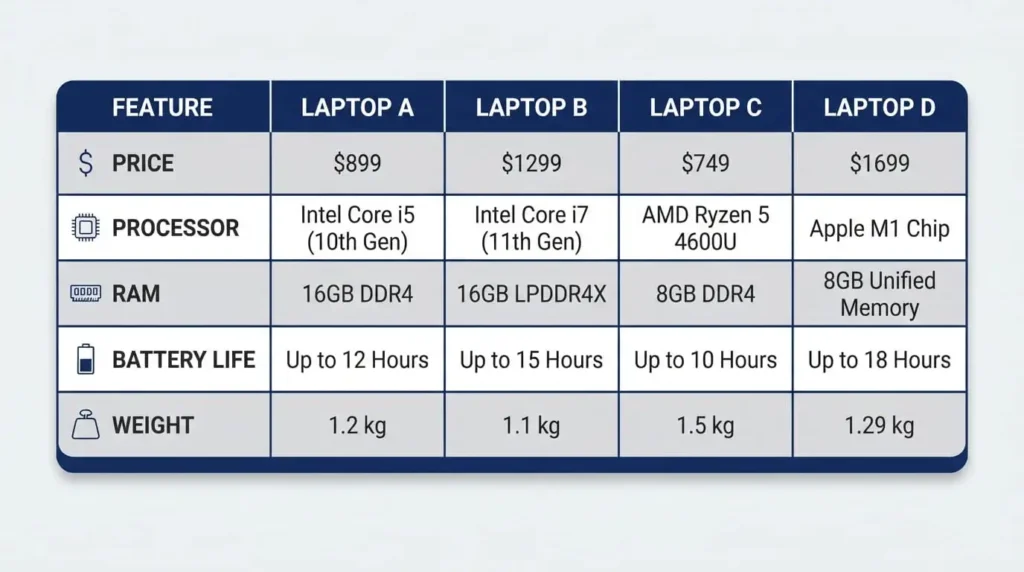
For RAM, 16GB is the realistic starting point for anyone running video calls, a browser with dozens of tabs, and an Office suite at the same time. Some retailers list 8GB as a workable minimum for light use, but that number gets tight fast once a business user adds spreadsheets, a CRM tab, and a Teams call to the mix. If budget allows, 32GB gives more room for the next few years without an upgrade.
Battery Life And Weight For Work And Travel
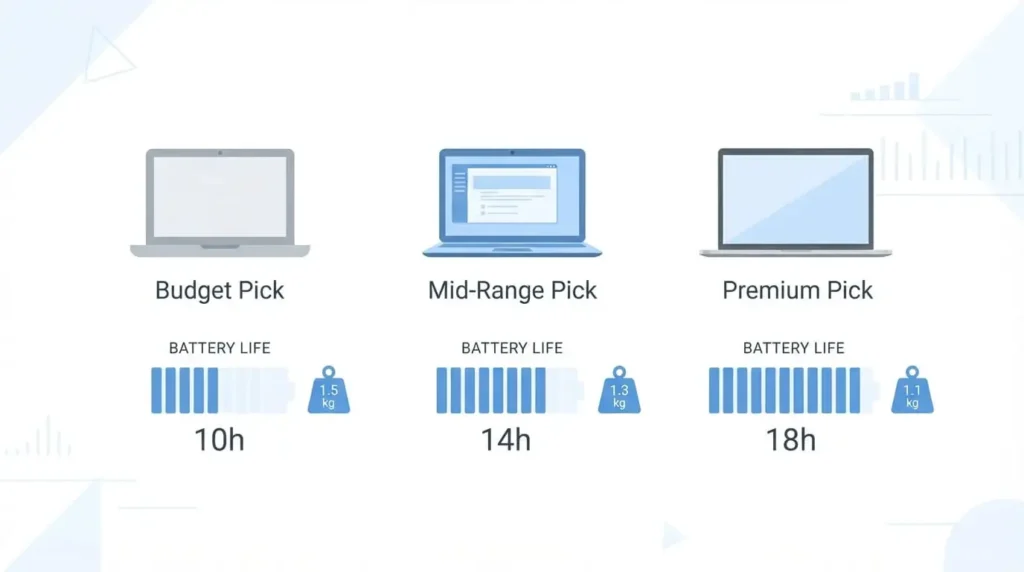
A laptop that dies by 3 p.m. isn’t a business laptop, no matter how fast its processor is. Real-world battery life now stretches well past the workday on several models. Newegg’s 2026 testing found the Acer Swift Go 14, built on a Snapdragon X Plus chip, lasting close to 18 hours under mixed real-world use, which is enough to skip the charger entirely on most travel days.
Weight matters just as much if the laptop leaves the house. Lenovo’s ThinkPad X1 Carbon Gen 13 weighs about 1.12 kg, making it one of the lightest 14-inch business laptops sold today. For anyone who carries a laptop through airports or between meetings, that difference adds up over a full day.
Display And Webcam Quality For Calls, Docs, And Streaming
Screen size in the 13 to 15-inch range balances workspace against portability. Resolution matters more than size for daily comfort: Full HD works for basic tasks, QHD adds room for side-by-side documents, and OLED panels like the one on the Zenbook S 14 improve color accuracy for anyone editing photos or video on the side.
Webcam and microphone quality deserve more attention than they usually get, since video calls are now a daily business task for most remote and hybrid workers. A laptop with a grainy 720p camera and a muffled mic makes every client call feel less professional, even if the processor underneath is excellent.
Storage: How Much SSD Space A Dual-Use Laptop Needs
An SSD, not a hard drive, should be non-negotiable. It cuts boot times, speeds up file access, and makes the whole system feel faster in daily use. For capacity, 512GB covers most business documents plus a personal photo and video library without constant cleanup. Heavy media users, or anyone who keeps large project files locally instead of in the cloud, should look at 1TB.
Security Features That Keep Work And Personal Data Apart
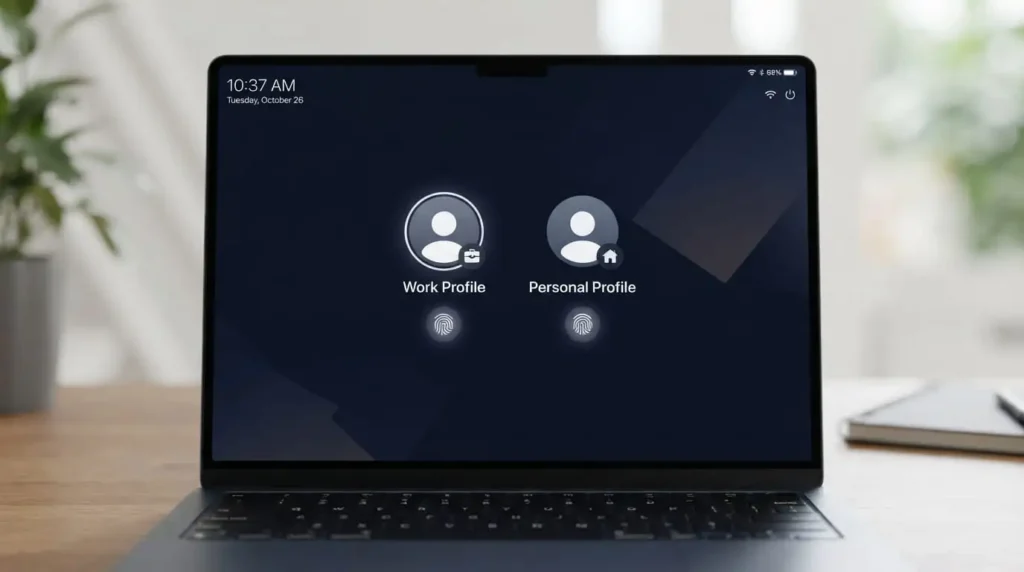
Running work and personal accounts on one machine raises the stakes on security. Fingerprint readers and Windows Hello face login speed up daily use while keeping the login itself harder to guess than a typed password. Full-disk encryption protects files if the laptop is lost or stolen, and separate user accounts for work and personal profiles keep browser history, saved passwords, and files from mixing.
Lenovo’s ThinkShield suite, built into ThinkPad business models, bundles firmware-level protections with biometric login and optional IR camera authentication. Regular OS updates and antivirus software matter just as much as the hardware, since even the best security chip can’t protect an outdated system.
Best Laptops For Business And Personal Use By Budget
Budget Pick Under $900: Acer Swift Go 14
At $699, the Acer Swift Go 14 with a Snapdragon X Plus chip is one of the better-value business laptops available in 2026. Its NPU accelerates Copilot+ features in Microsoft 365 and Teams, and its long battery life suits anyone whose workload centers on browser-based tools and video calls rather than heavy local processing.
Mid-Range Pick $900 To $1,500: Dell 14 Plus
The Dell 14 Plus, priced around $959.99, pairs solid Core Ultra performance with strong battery life in independent testing. It’s a practical pick for small business owners who want dependable daily performance without paying premium prices, especially when bought during a sale.
Premium Pick Above $1,500: ThinkPad X1 Carbon Or MacBook Air
For executives and road warriors, the Lenovo ThinkPad X1 Carbon Gen 13 remains a top choice thanks to its keyboard, light weight, and ThinkShield security suite. Apple’s MacBook Air with the M5 chip is the strongest alternative for users who split time between creative personal projects and business tasks, thanks to its long battery life and quiet, fanless design.
Windows, MacOS, Or Chrome OS: Which Fits Dual Use Best
Windows still has the widest compatibility with business software, from industry-specific accounting tools to enterprise VPN clients, which makes it the safer default for anyone who doesn’t already know their software needs macOS. macOS trades some of that compatibility for a smoother interface and strong built-in security, and it’s a natural fit for users who lean on Apple’s other devices. Chrome OS works best for people whose business tasks are already web-based, such as email, spreadsheets in the browser, and video calls, but it struggles with software that needs a full desktop install.
Keeping Work And Personal Data Separate On One Machine
Even on one laptop, work and personal life don’t have to mix in the file system. Setting up separate user accounts keeps browser bookmarks, saved logins, and downloaded files apart by default. A business VPN for work sessions, paired with cloud backup that’s scoped separately for work and personal folders, adds another layer without needing two physical machines.
Regularly updating the operating system and running antivirus software protects both sides of that split, since a security gap on the personal side can just as easily expose work files stored on the same drive.
Picking the right laptop for business and personal use comes down to matching the specs above to how the day actually splits between work and life. Buy for the heavier of the two workloads, not the lighter one, and the lighter tasks will always run comfortably on top.
FAQ‘S
1:Can one laptop really handle both business and personal use?
Yes, for most users. A laptop with a current-generation processor, 16GB of RAM, and an SSD handles office software, video calls, streaming, and casual photo editing without needing a second machine. Heavy gaming or professional video editing usually still benefits from a separate desktop or a laptop with a dedicated GPU.
2:How much RAM do I need for business and personal use?
16GB is the practical minimum for running video calls, multiple browser tabs, and office software at the same time without slowdown. 32GB adds headroom for heavier multitasking and extends how long the laptop stays comfortable to use as software gets more demanding.
3:Is a MacBook or Windows laptop better for business and personal use?
It depends on the software you already rely on. Windows has broader compatibility with business and enterprise tools, while macOS offers a smoother interface and strong built-in security, which suits users already in the Apple ecosystem.
4:Do I need a dedicated graphics card for personal and business use?
Most business and personal tasks, including video calls, browsing, streaming, and office work, run fine on integrated graphics. A dedicated GPU only becomes necessary for gaming, video editing, or other graphics-heavy creative work.
5:How long should battery life last on a dual-use laptop?
Aim for at least 8 to 10 hours of real-world use, since manufacturer estimates are usually higher than daily performance. Several 2026 models, including Snapdragon-based laptops like the Acer Swift Go 14, now advertise closer to 18 hours under mixed use.
6:Is 8GB of RAM enough for a business and personal laptop?
8GB works for basic browsing and document editing but gets tight quickly once video calls, spreadsheets, and multiple tabs run together. For a laptop meant to cover both business and personal tasks comfortably, 16GB is a safer starting point.