Netflix removed the download button from its Windows app in 2024, and Mac has never had a native Netflix app at all. Chromebook owners can still download movies the official way through the Google Play Store app, while Windows and Mac users need an Android emulator or a third-party tool to get the same result.
Download Netflix Movies on Laptop: What Changed in 2024
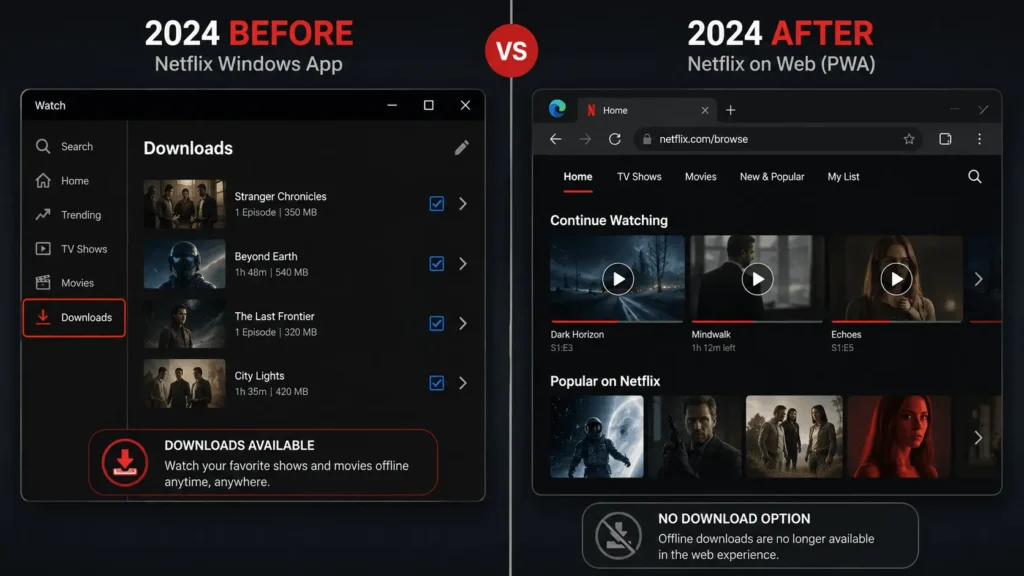
For years, the Netflix app on Windows worked like a real desktop program, with its own Downloads tab sitting right inside the interface. That changed in 2024. Netflix warned users in May that a major update was coming, and by July the rollout was finished. The new Windows app is a Progressive Web App, meaning it opens netflix.com inside a Microsoft Edge container and behaves like a browser tab wearing an app icon. Netflix told Windows Latest that the new app mirrors the browser streaming experience, and browser-based Netflix has never supported downloads because of DRM restrictions.
That single change is why so many people search for a way around it. If your laptop runs Windows and you open the current Netflix app expecting a download icon, it simply is not there anymore. Mac users never had this feature to lose in the first place, since there is no native Netflix app for macOS, only browser streaming. Lenovo Community.
Download Netflix Movies on a Chromebook, The Official Method
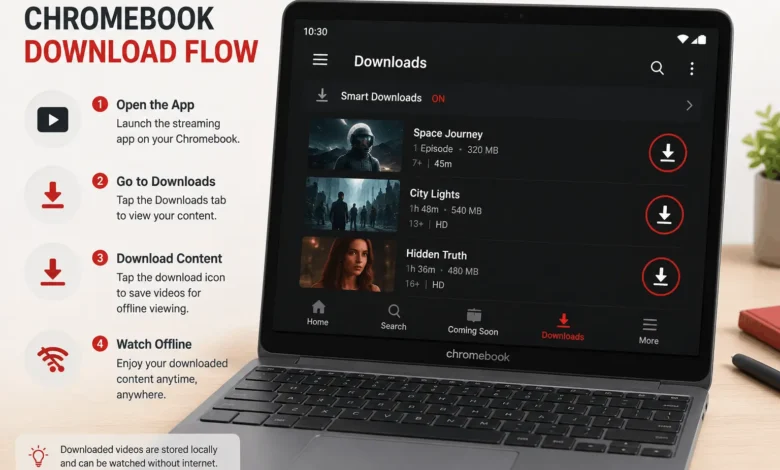
If your laptop happens to be a Chromebook, you are in a better position than Windows or Mac users. Chromebook users still have an official way to download Netflix content directly from the Google Play Store, since Chromebooks can run the same Android app that phones and tablets use.
Steps to Download on Chromebook
Open the Google Play Store, search for Netflix, and install the app if it is not already on your device. Sign in with your account, then tap My Netflix at the bottom of the screen, select Downloads, and tap Find More to Download to browse titles available for offline viewing. Tap the download icon on any movie, and it saves inside the app rather than as a regular file you can move around.
One limitation worth knowing: downloads on Chromebook are stored locally in the Netflix app and can’t be transferred to other devices, and quality is often capped at SD or HD rather than 4K. Not every Chromebook supports this either, since it depends on whether the device has Google Play Store access built in.
Download Netflix Movies on Windows or Mac Using an Android Emulator
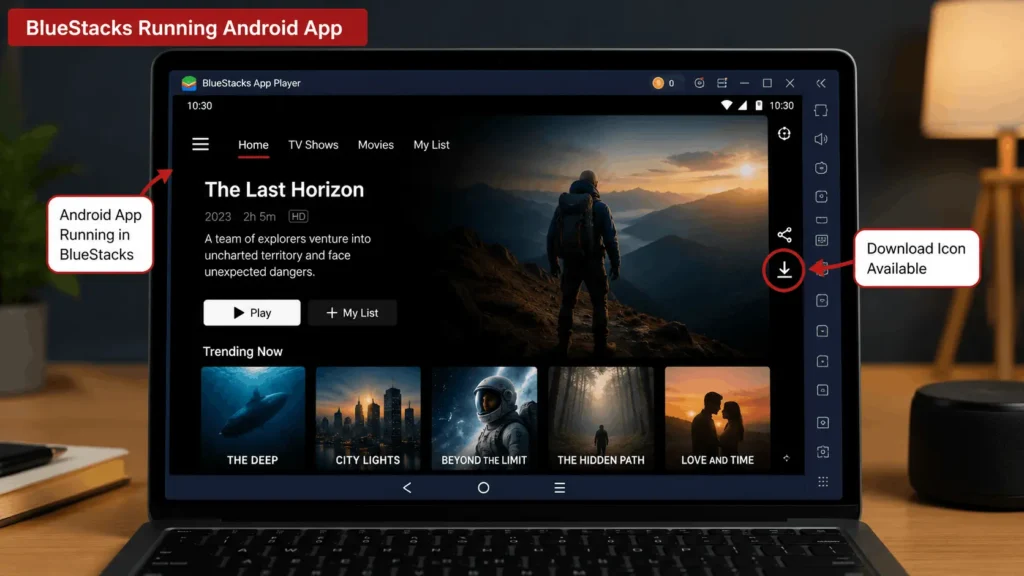
For a laptop that is not a Chromebook, running the actual Android version of Netflix inside an emulator is the closest thing to an official workaround. An emulator creates a virtual Android device on your computer, so apps built for phones run on a desktop instead. Programs such as BlueStacks let you install the Netflix Android app through the Google Play Store, and after installation the app works much like it does on a phone, including signing in and using the download feature to save movies for offline viewing inside the emulator.
Setting up BlueStacks for Netflix Downloads
Download BlueStacks from its official site and install it for your laptop’s operating system, whether that is Windows or Mac. Launch it, sign in with a Google account to unlock the Play Store inside the emulator, then search for Netflix and install it the same way you would on a phone. From there, sign in to your Netflix account and use the download icon exactly as you would on a mobile device. According to community discussion threads, the three tools people mention most often for this are Windows Subsystem for Android, BlueStacks, and Android Studio, with BlueStacks generally considered the easiest to set up.
Download Netflix Movies With Third-Party Tools, and Why to Think Twice
A separate category of tools records or extracts Netflix video and saves it as a standalone MP4 or MKV file that plays in VLC or Windows Media Player, with no expiration date. These tools work by capturing the video signal or bypassing the platform’s copy protection rather than using Netflix’s own download feature.
That distinction matters. Getting around DRM protections can conflict with Netflix’s terms of service, and depending on where you live, it may also raise copyright or anti-circumvention concerns under local law. If offline viewing is the goal, the Chromebook and emulator methods above use Netflix’s own download system as intended, which is a simpler and lower-risk path for most people.
Download Netflix Movies on Laptop: Managing Storage, Quality, and Limits
Whichever method you use, Netflix’s own download rules still apply. Ad-free plans can have up to 100 active downloads at a time per device, while ad-supported plans are limited to 15 total downloads per device each calendar month. If you cancel your account, downloads on the device get deleted, and restarting your membership means downloading everything again.
Downloads also do not last forever. Downloads will expire after a period of time, and some titles have a limit on how many times they can be downloaded per year. You need to stay signed in to your Netflix account to keep accessing downloads offline, so signing out before a flight can lock you out of content you already saved. The same account-management rules matter on other devices too, especially when you need to sign out of Netflix on a shared TV.
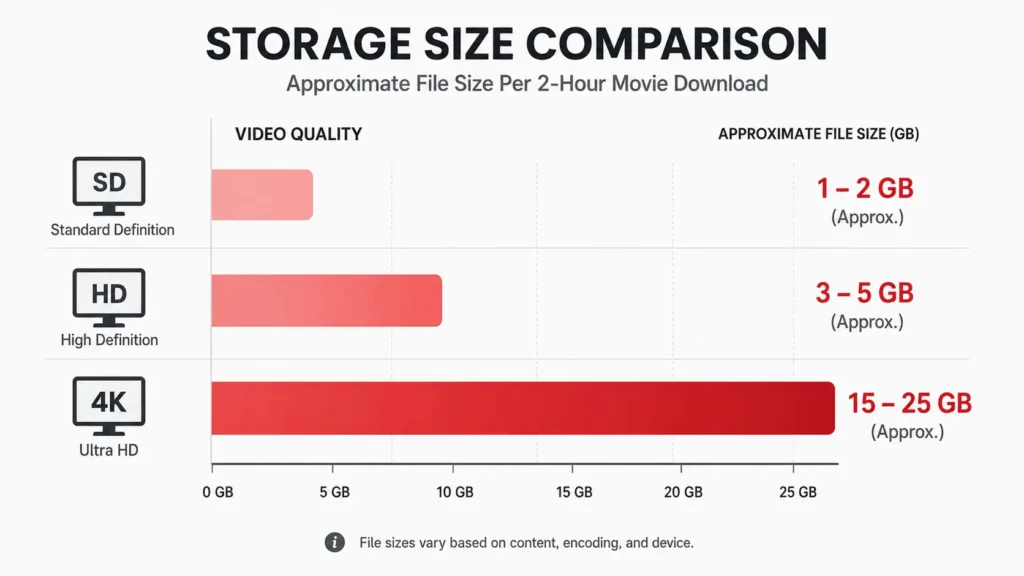
Storage matters too, especially inside an emulator that shares your laptop’s drive. Stick to HD instead of 4K if space is tight, since higher resolution files add up fast across multiple movies.
Download Netflix Movies on Laptop: Which Method Fits You
If you own a Chromebook, use the Google Play Store method first since it is the officially supported path and needs no extra software. If your laptop runs Windows or Mac and you want the real Netflix app experience, an Android emulator like BlueStacks gets you there with a bit more setup. Third-party downloader tools exist and get search traffic for a reason, but they carry legal and terms-of-service risk that the other two methods avoid entirely.
FAQ‘S
1. Can you download Netflix movies directly on a Windows laptop?
Not through the current Netflix app. Since 2024 the Windows app has been a browser wrapper with no download feature, so you need an Android emulator or the Chromebook method described above to get downloads working on a Windows machine.
2. Does Netflix work on Mac laptops for downloads?
There has never been a native Netflix app for macOS, only browser streaming. Mac users looking to download movies need to run the Android app through an emulator like BlueStacks.
3. Is downloading Netflix through an emulator against Netflix’s rules?
Running the official Android app inside an emulator uses Netflix’s own download feature as intended, unlike tools that bypass DRM protections directly. It is generally considered lower risk, though emulator performance and compatibility can vary by device.
4. How many Netflix titles can you download at once?
It depends on your plan. Ad-free plans allow up to 100 active downloads per device, while ad-supported plans cap out at 15 downloads per device each month.
5. Do Netflix downloads expire?
Yes. Downloaded titles expire after a set period, and some have an annual limit on how many times they can be re-downloaded. Staying signed in to your account is required to keep watching them offline.